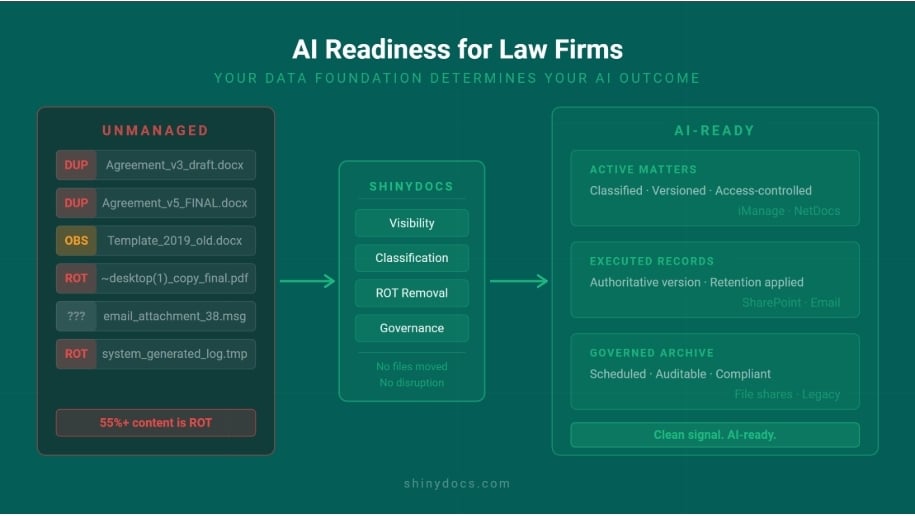
Shadow Copies Are Quietly Undermining Your System of Record

April 1, 2026

[fa icon="comment"]  0 Comments

You're Not Alone in This - and It's More Solvable Than You Think!

Read more

Streamline Your Content Strategy to Eliminate Info Sprawl & Power AI

July 23, 2025

[fa icon="comment"]  0 Comments

(Approx. 4 mins read)

Read more

Maximize Your Most Valuable Assets: People, Data, and the Tech That Brings Them to Life

September 3, 2025

[fa icon="comment"]  0 Comments

(Approx. 3 mins read)

Read more

Why Finding Your Company’s Information Should Be as Easy as Googling Your Lunch

September 3, 2025

[fa icon="comment"]  0 Comments

(Approx. 2 mins read)

Read more

AI Data Extraction That Actually Works: Make Sense of Your Legacy Documents

September 19, 2025

[fa icon="comment"]  0 Comments

(Approx. 3 mins read)

Read more

The Future of Enterprise AI: 10 Game-Changing Predictions

April 23, 2025

[fa icon="comment"]  0 Comments

(Approx. 7 mins read)

Read more

Choosing the Right AI for Your Business: Open-Source vs. Vendor-Locked Solutions

September 2, 2025

[fa icon="comment"]  0 Comments

(Approx. 5 mins read)

Read more

The Enterprise AI Revolution: Why You Need More Than Just Microsoft's Copilot

September 24, 2025

[fa icon="comment"]  0 Comments

(Approx. 4 mins read)

Read more

Comprehensive Guide to Types of Data Migration

October 10, 2024

[fa icon="comment"]  0 Comments

Data migration is a pivotal process for organizations looking to upgrade systems, consolidate data, or move to the cloud. Understanding the various types of data migration is crucial for ensuring a smooth and efficient transition. This comprehensive guide explores the different types of data migration, their benefits, challenges, and best practices.

What is Data Migration?

Data migration refers to the process of transferring data between storage types, formats, or computer systems. This process is essential for organizations implementing new systems, upgrading existing ones, or consolidating data to improve efficiency, reduce costs, or enhance system performance. Data migration encompasses several critical stages to ensure the successful transfer and integrity of data.

Key Stages of Data Migration

  1. Planning and Assessment: The initial phase involves thorough planning and assessment. This includes understanding the scope of the migration, defining objectives, and identifying potential risks. Organizations must evaluate the current data landscape, including data quality, volume, and complexity, to develop a comprehensive migration strategy.
  2. Data Profiling and Cleansing: Before migration, it is crucial to profile and cleanse the data. Data profiling involves analyzing the data to understand its structure, relationships, and quality. Data cleansing ensures that the data is accurate, complete, and consistent by correcting errors, removing duplicates, and standardizing formats.
  3. Mapping and Design: This stage involves mapping the data from the source system to the target system. Data mapping defines how each data element from the source system corresponds to the target system. The design phase includes creating the architecture for data migration, including data models, migration scripts, and transformation rules.
  4. Migration Execution: During the execution phase, the actual transfer of data takes place. This can be done using various techniques such as ETL (Extract, Transform, Load), bulk data transfer, or incremental data loading. It is essential to monitor the migration process to ensure that data is transferred accurately and efficiently.
  5. Validation and Testing: After migration, extensive validation and testing are performed to ensure data integrity and accuracy. This involves comparing the source and target data, running data validation scripts, and performing functional tests to verify that the migrated data meets the required standards.
  6. Deployment and Cutover: Once testing is complete, the migrated data is deployed to the production environment. The cutover phase involves switching from the old system to the new system, ensuring minimal disruption to business operations. This may include running parallel systems temporarily and providing support for any issues that arise during the transition.
  7. Post-Migration Audit and Maintenance: After deployment, a post-migration audit is conducted to verify that all data has been migrated correctly and that the new system is functioning as expected. Ongoing maintenance ensures that the data remains accurate and consistent, and any issues that arise are promptly addressed.

Types of Data Migration

Storage Migration

Storage migration involves moving data from one storage medium to another. This is typically done to upgrade to faster, more efficient storage systems or to consolidate storage resources. The main benefits include improved performance, reduced costs, and enhanced data management capabilities.

Benefits

  • Increased storage efficiency
  • Enhanced data accessibility
  • Reduced operational costs

Challenges

  • Potential data loss or corruption during transfer
  • Compatibility issues with new storage systems
  • Downtime during migration

Database Migration

Database migration involves transferring data between databases or from an older database version to a newer one. This is common when upgrading database software or moving to a different database platform. Key considerations include ensuring data integrity, maintaining data relationships, and minimizing downtime.

Benefits

  • Improved database performance
  • Enhanced data security
  • Better integration with modern applications

Challenges

  • Complex data mapping and transformation
  • Potential data integrity issues
  • Significant planning and testing required

Application Migration

Application migration entails moving application software from one environment to another. This could be from on-premises to the cloud, or between cloud environments. It’s often driven by leveraging new technologies, improving scalability, or reducing operational costs.

Benefits

  • Access to advanced features and functionalities
  • Improved application performance and scalability
  • Cost savings through optimized infrastructure

Challenges

  • Application compatibility issues
  • Data loss or corruption risks
  • Potential downtime during migration

Cloud Migration

Cloud migration refers to the process of moving data, applications, and other business elements to a cloud computing environment. This type of migration is popular for its scalability, flexibility, and cost-efficiency. Cloud migration strategies include rehosting, refactoring, and re-platforming.

Benefits

  • Scalability and flexibility
  • Reduced infrastructure costs
  • Enhanced disaster recovery capabilities

Challenges

  • Data security and compliance concerns
  • Potential downtime during migration
  • Integration with existing systems

Business Process Migration

Business process migration involves moving applications and associated data to a new environment that supports the organization’s business processes. This is often part of a larger business transformation initiative and can include migrating business functions like HR, finance, and operations.

Benefits

  • Streamlined business processes
  • Enhanced operational efficiency
  • Better alignment with business objectives

Challenges

  • Ensuring process continuity
  • Managing organizational change
  • Integration with existing workflows

Data Center Migration

Data center migration involves moving data and applications from one data center to another. This could be due to consolidation, relocation, or transitioning to a cloud-based data center. Key considerations include minimizing downtime, ensuring data integrity, and maintaining service levels.

Benefits

  • Reduced operational costs
  • Improved data center efficiency
  • Enhanced disaster recovery and business continuity

Challenges

  • Significant planning and coordination
  • Potential data loss or corruption
  • Downtime during migration

Best Practices for Data Migration

Plan Thoroughly

A successful data migration starts with detailed planning. Define your objectives, assess the scope, and develop a comprehensive strategy that includes timelines, resources, and potential risks.

Conduct a Data Audit

Before migration, conduct a thorough audit of your data. Identify redundant, obsolete, or trivial (ROT) data that can be cleaned up to streamline the migration process.

Ensure Data Quality

Data quality is paramount during migration. Implement data validation and cleansing processes to ensure the data being migrated is accurate, complete, and consistent.

Test Extensively

Testing is critical to a successful data migration. Conduct multiple rounds of testing to identify and address any issues before the actual migration. This includes testing the migration process, data integrity, and system performance.

Monitor and Validate

During the migration, continuously monitor the process to ensure it is proceeding as planned. After migration, validate that all data has been successfully transferred and that applications are functioning correctly in the new environment.

Understanding the various types of data migration and following best practices is essential for a smooth transition. Whether migrating storage, databases, applications, or entire data centers, careful planning, thorough testing, and ongoing monitoring are key to mitigating risks and ensuring success. By leveraging the right strategies and tools, organizations can achieve their migration goals while minimizing disruptions and maximizing benefits.

Key Takeaways

  • Storage Migration: Moves data to new storage systems for better performance and cost efficiency.
  • Database Migration: Transfers data between databases or database versions, improving performance and security.
  • Application Migration: Shifts applications to new environments, enhancing scalability and reducing costs.
  • Cloud Migration: Moves data and applications to the cloud, offering flexibility and cost savings.
  • Business Process Migration: Aligns business functions with new environments, streamlining processes and boosting efficiency.

About Shinydocs

Shinydocs automates the process of finding, identifying, and actioning the exponentially growing amount of unstructured data, content, and files stored across your business. 

Our solutions and experienced team work together to give organizations an enhanced understanding of their content to drive key business decisions, reduce the risk of unmanaged sensitive information, and improve the efficiency of business processes. 

We believe that there’s a better, more intuitive way for businesses to manage their data. Request a meeting today to improve your data management, compliance, and governance.


Read more

Data Conversion vs Data Migration: Key Differences

October 10, 2024

[fa icon="comment"]  0 Comments

As organizations grow and evolve, managing data becomes increasingly complex. Two critical processes in data management are data conversion and data migration. Although these terms are often used interchangeably, they refer to distinct processes with unique objectives and methodologies. Understanding the key differences between data conversion and data migration is essential for ensuring data integrity and optimizing system performance. This blog will delve into the nuances of data conversion vs data migration, exploring their definitions, processes, and applications.

What is Data Conversion?

Definition

Data conversion involves transforming data from one format or structure to another. This process is necessary when systems or applications need to interpret and utilize data differently due to varying data formats, coding standards, or database structures. The primary goal of data conversion is to ensure that data remains usable and accessible after the transformation.

Key Steps in Data Conversion

  1. Data Profiling: Analyze the source data to understand its format, structure, and quality.
  2. Mapping: Define how data elements in the source format correspond to the target format.
  3. Transformation: Apply the necessary changes to convert the data into the desired format.
  4. Validation: Verify that the converted data maintains its integrity and functionality.
  5. Loading: Import the converted data into the target system.

Applications of Data Conversion

  • System Upgrades: When upgrading software or hardware, data often needs to be converted to be compatible with the new system.
  • Integration: Combining data from different sources with varying formats requires data conversion to ensure consistency and usability.
  • Standardization: Organizations may convert data to adhere to standardized formats, improving data quality and interoperability.

What is Data Migration?

Definition

Data migration involves moving data from one system, storage type, or application to another. This process can include data conversion but primarily focuses on transferring data to improve system performance, reduce costs, or upgrade to more advanced technologies. Data migration aims to ensure that data is accurately transferred and fully functional in the new environment.

Key Steps in Data Migration

  1. Planning and Assessment: Define the scope, objectives, and risks of the migration.
  2. Data Profiling and Cleansing: Analyze and clean the data to ensure quality and integrity.
  3. Mapping and Design: Design the architecture for data migration, including data models and migration scripts.
  4. Migration Execution: Transfer the data using techniques such as ETL (Extract, Transform, Load) or bulk data transfer.
  5. Validation and Testing: Validate the migrated data to ensure accuracy and functionality.
  6. Deployment and Cutover: Deploy the migrated data to the production environment and switch over from the old system.
  7. Post-Migration Audit and Maintenance: Conduct audits and provide ongoing maintenance to ensure data integrity and system performance.

Applications of Data Migration

  • System Upgrades and Replacements: Migrating data to new systems to leverage advanced features and improved performance.
  • Cloud Adoption: Moving data to cloud environments for better scalability and cost efficiency.
  • Data Consolidation: Combining data from multiple sources into a single repository to improve data management and accessibility.

Key Differences Between Data Conversion and Data Migration

Objective

Data Conversion

The primary objective of data conversion is to change data formats and structures to ensure compatibility and usability within a new system or application. This process is essential when systems or applications require data in specific formats to function correctly. Data conversion focuses on transforming the data without necessarily moving it to a new system. For example, converting data from a legacy format to a more modern format to be used in a new application while maintaining its original context and meaning.

Data Migration

Data migration, on the other hand, aims to transfer data from one system, storage type, or environment to another. While data conversion may be part of this process, the primary focus is on the accurate and efficient relocation of data. The objective of data migration is broader and more comprehensive, encompassing the entire process of moving data to improve system performance, reduce costs, or upgrade to more advanced technologies. This often involves significant changes to the way data is stored and accessed, ensuring it remains functional in the new environment.

Scope

Data Conversion

The scope of data conversion is typically limited to transforming data within the same system or during integration between systems. The goal is to make the data accessible and usable in its new format without changing its location. This process might involve converting data fields, adjusting data types, or restructuring datasets to match the requirements of the target system or application. Data conversion ensures that the data can be seamlessly integrated and utilized by different systems or applications that require it in specific formats.

Data Migration

Data migration involves a broader scope, including moving data across different systems, storage types, or environments. This process is more extensive as it includes planning, assessing, and executing the transfer of data while ensuring minimal disruption to business operations. Data migration often involves not just converting data formats but also moving it to entirely different platforms, such as migrating on-premises databases to cloud-based solutions. This comprehensive approach ensures that all data components are transferred accurately and remain fully functional in the new environment.

Process

Data Conversion

The process of data conversion involves several specific steps to ensure the data is transformed accurately:

  1. Data Profiling: Analyze the source data to understand its format, structure, and quality.
  2. Mapping: Define how data elements in the source format correspond to the target format.
  3. Transformation: Apply the necessary changes to convert the data into the desired format.
  4. Validation: Verify that the converted data maintains its integrity and functionality.
  5. Loading: Import the converted data into the target system.

These steps are focused on changing the data format and structure without moving the data to a different system.

Data Migration

Data migration encompasses a more comprehensive set of processes to ensure successful data transfer:

  1. Planning and Assessment: Define the scope, objectives, and risks of the migration.
  2. Data Profiling and Cleansing: Analyze and clean the data to ensure quality and integrity.
  3. Mapping and Design: Design the architecture for data migration, including data models and migration scripts.
  4. Migration Execution: Transfer the data using techniques such as ETL (Extract, Transform, Load) or bulk data transfer.
  5. Validation and Testing: Validate the migrated data to ensure accuracy and functionality.
  6. Deployment and Cutover: Deploy the migrated data to the production environment and switch over from the old system.
  7. Post-Migration Audit and Maintenance: Conduct audits and provide ongoing maintenance to ensure data integrity and system performance.

This extensive process ensures that data is accurately transferred and fully functional in the new environment.

Complexity

Data Conversion

Data conversion is generally less complex than data migration. It focuses primarily on format and structure changes within a single system. The key challenges involve ensuring that data is accurately transformed and remains usable in its new format. Data conversion might require less planning and fewer resources compared to data migration, making it a more straightforward process when only format changes are needed.

Data Migration

Data migration is inherently more complex, involving multiple systems or environments. This complexity arises from the need to move large volumes of data accurately while ensuring data integrity, compatibility, and system performance. Data migration requires extensive planning, coordination, and testing to mitigate risks such as data loss, corruption, or system downtime. The involvement of various stakeholders, the need for comprehensive validation, and the potential impact on business operations add layers of complexity to the migration process.

Understanding the differences between data conversion and data migration is crucial for effective data management. Data conversion ensures that data remains usable and accessible by transforming it into compatible formats. In contrast, data migration focuses on transferring data across systems or environments to improve performance, reduce costs, or adopt new technologies. By recognizing the unique objectives, scopes, and processes of these two critical functions, organizations can better plan and execute their data management strategies, ensuring data integrity and optimizing system performance.

Key Takeaways

  • Data Conversion: Transforms data formats and structures to ensure compatibility and usability within the same or different systems.
  • Data Migration: Transfers data across systems or environments, often including data conversion, to improve performance and reduce costs.
  • Objective Differences: Data conversion focuses on format changes, while data migration focuses on accurate and efficient data relocation.
  • Scope and Complexity: Data conversion has a narrower scope and is less complex compared to the broader, more complex scope of data migration.
  • Critical Processes: Both data conversion and data migration involve detailed planning, profiling, validation, and testing to ensure successful outcomes.

About Shinydocs

Shinydocs automates the process of finding, identifying, and actioning the exponentially growing amount of unstructured data, content, and files stored across your business. 

Our solutions and experienced team work together to give organizations an enhanced understanding of their content to drive key business decisions, reduce the risk of unmanaged sensitive information, and improve the efficiency of business processes. 

We believe that there’s a better, more intuitive way for businesses to manage their data. Request a meeting today to improve your data management, compliance, and governance.

Read more

Recent Posts

Subscribe to Email Updates