Key Takeaways
-
Poor data quality costs organizations $12.9 million annually, and dark-data breaches take 26% longer to identify.
-
Redundant, obsolete, and trivial (ROT) data makes up roughly 80% of unstructured data past its retention period.
-
Regulators expect organizations to know exactly what data they hold, making defensible deletion an audit-readiness requirement.
-
Feeding AI systems ROT reduces accuracy, introduces bias, and undermines reliable business insights.
-
County of Newell cut storage costs 27%, and removing 100TB of unused data saves roughly $27,600 annually in backup costs.
.png?width=1001&height=667&name=Untitled%20design%20(3).png)
If your file shares feel like a digital junk drawer, file cleanup through data remediation helps your organization get clutter under control. Your team likely pays to store and protect years of duplicate drafts, outdated records, and forgotten files nobody opens. Meanwhile, your employees still struggle to find the documents they actually need.
In this guide, you’ll learn why ROT data drives up costs, risk, and compliance headaches. You’ll also discover how to prepare your team and follow a step-by-step process to defensibly clear out what you don’t need. We’ll cover the business impact, from lower storage bills to faster audits and more reliable AI.
What is Data Remediation?
Data Remediation is the process of identifying, organizing, classifying, and removing unstructured data your organization no longer needs. It helps your organization clean up information stored across file shares, cloud storage, email, document management systems, and other repositories by identifying duplicate files, outdated records, and information with little or no business value.
The goal is simple: keep what matters and defensibly dispose of what doesn't. Organizations define the rules that determine what content should be retained or removed, ensuring valuable information stays while redundant, obsolete, and trivial (ROT) data is safely disposed of.
Every deletion is backed by a complete audit trail, providing defensible proof of what was removed and why. The result is a smaller, cleaner, lower-risk information environment that's easier to manage, less expensive to store, and better aligned with compliance, governance, and AI readiness initiatives.
Why Data Remediation and File Cleanup Matters?
Data remediation is important because it reduces business risk, supports regulatory compliance, lowers storage costs, and helps employees find the information they need faster. By removing redundant, obsolete, and trivial (ROT) data, organizations can better manage their information and improve operational efficiency.
- Risk: Unmanaged data increases your exposure to breaches and non-compliance.
- Compliance: Regulators expect you to know what data you hold and why, which is nearly impossible with unmanaged data.
- Cost: Every file you store costs money, whether you use it or not. Most enterprise IT organizations now spend over 30% of their budget on data storage, backups, and disaster recovery.
- Productivity: Employees waste time searching through useless data to find what they need.
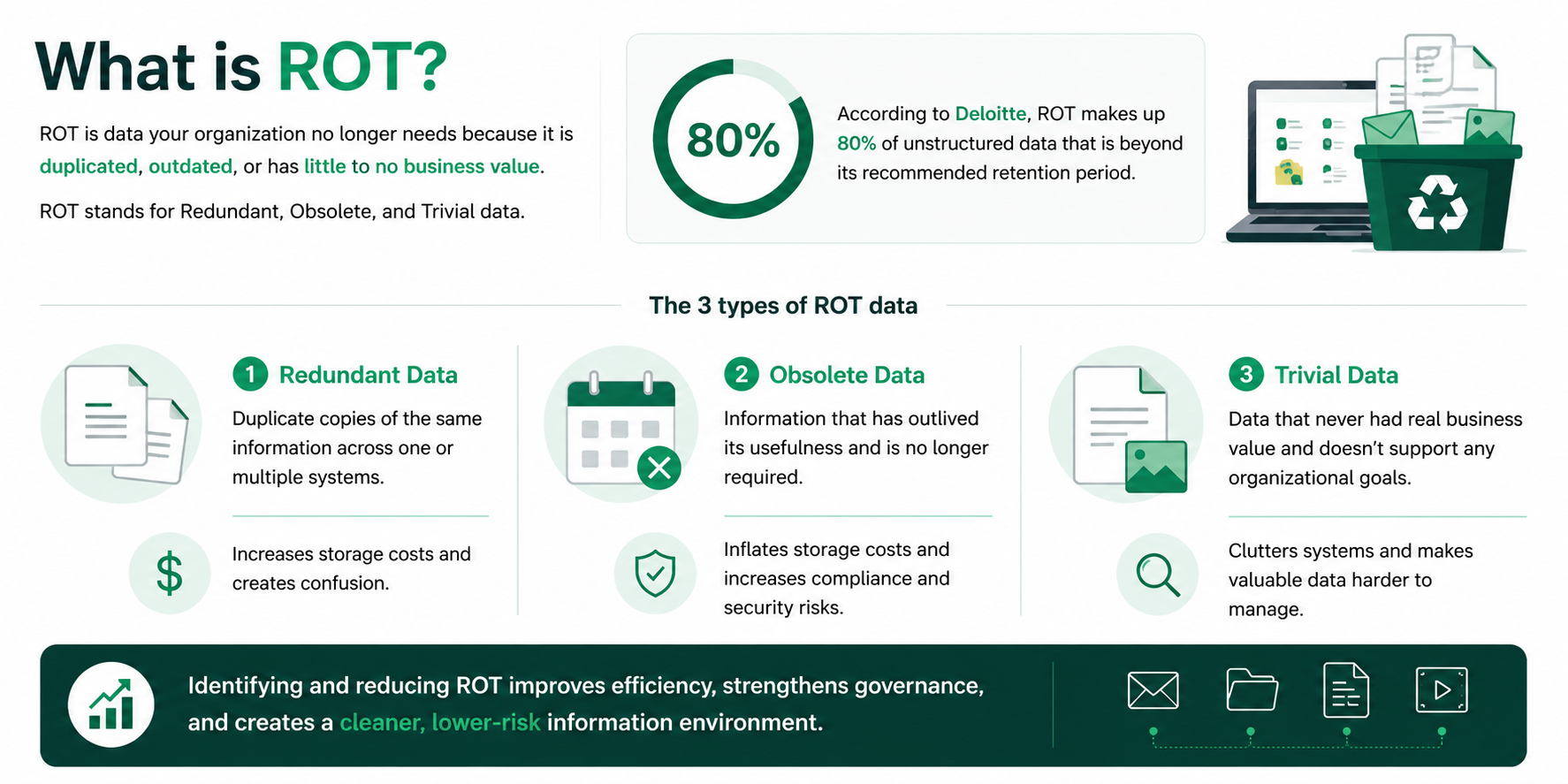
What is ROT?
ROT is data your organization no longer needs because it is duplicated, outdated, or has little to no business value. The term stands for redundant, obsolete, and trivial data.
According to Deloitte, ROT makes up 80 percent of unstructured data that is beyond its recommended retention period.
ROT inflates storage costs, increases security risk, and makes it harder to manage, protect, and find the information your team needs. It typically exists within unstructured data, including emails, documents, and files that don't follow a fixed format.
As data volumes grow, identifying and reducing ROT helps organizations improve efficiency, strengthen governance, and maintain a cleaner information environment. Removing ROT is often the fastest way to see measurable results from a data cleanup program.
Here's how to identify each type of ROT data:
Redundant Data
Redundant data refers to duplicate copies of the same information. These duplicates can exist within a single system or across multiple systems. They increase storage costs and make it harder to identify the most accurate or current versions of files.
Obsolete Data
Obsolete data has outlived its usefulness and is no longer required for business, legal, or operational purposes. Not only does obsolete data inflate storage costs, but it can also increase compliance and security risks.
Trivial Data
Trivial data never had real business value to begin with and doesn’t support any organizational goals. This type of data clutters information environments, making it difficult to manage valuable content effectively.
Data Remediation Key Terms
Data remediation comes with its own vocabulary. By understanding key terms, your team can communicate more effectively throughout the data remediation process. Here are the terms you'll hear most often:
|
Term |
Definition |
|
Data Classification |
Data classification is the process of organizing and labeling information based on its content, sensitivity, business value, or retention requirements. |
|
ROT Removal |
ROT removal is the process of identifying and removing redundant, obsolete, and trivial data that no longer provides business value. |
|
Defensible Disposition |
Defensible disposition is the documented process of securely deleting information according to established policies, with an audit trail that proves what was removed and why. |
|
Dark Data |
Information your organization stores but doesn’t know exists or isn’t actively managing. |
|
Useless Data |
Data that no longer supports any business, legal, or operational purpose. |
|
Data Hygiene |
The ongoing process of maintaining accurate, organized, and up-to-date data. |
|
Data Discovery |
Finds and catalogs data across every repository you own. |
|
Data Governance |
Sets the policies and rules that define how your organization manages information. |
|
Automated Data Governance |
Automated data governance is the use of software to classify, manage, and act on your organization's data based on predefined rules, without manual review. |
How to Prepare for Data Remediation
A successful data remediation program requires clear objectives, defined retention rules, data ownership, and organization-wide communication before remediation begins. A little preparation before starting a data remediation program goes a long way. Having a solid plan in place helps your organization get the most out of a data remediation initiative.
Prepare your team with the following 5 steps:
1. Set Goals and Define Priorities
- Outline the business outcomes you want to achieve through your data cleanup, so teams can prioritize efforts and measure success.
- Define measurable success metrics, such as reducing storage costs, eliminating duplicate files, improving searchability, or lowering compliance risk.
- Identify the systems and repositories with the highest volumes of data and most outdated information, start with these for the strongest impact.
2. Align on Retention Rules
- Work with legal, records, and compliance teams to define retention rules (how long different types of information should be kept).
- Define the criteria that determines what should be retained, archived, or defensibly disposed of.
- Apply retention rules consistently across every repository so the same information categories are managed the same way.
3. Map Your Repositories
- List each location that stores organizational data, including cloud storage platforms, file shares, document management systems, collaboration tools, and email systems.
- Document the type of information that exists in each repository, who has access to it, and any known risks such as duplicate or orphaned data.
4. Assign Data Owners
- Ensure every department understands who is responsible for their information.
- Have Data owners outline what information their teams manage, define its value, and support retention and disposition decisions.
- Establish a regular review process so data owners can periodically identify outdated, duplicate, or unnecessary information before it accumulates.
5. Communicate with Teams Early
- Explain why remediation matters and what changes teams can expect.
- Communicate how employees should handle information going forward, so systems stay clean.
- Provide clear guidance and training so employees know how to save, store, and dispose of information correctly after remediation is complete.
Steps in the Data Remediation Process
A successful data remediation program inventories your files, classifies them, applies retention policies, disposes of junk, and keeps systems clean.
It follows a clear, repeatable process to identify, evaluate, and remove unnecessary and high-risk data. Follow the steps below to help your organization’s data remediation program run smoothly.
1. Data Discovery Across Your Systems
Create a complete data inventory across file shares, cloud storage, email, collaboration tools, and legacy repositories.
- Locate where data exists across the organization.
- Understand what data exists using metadata and content analysis.
- Identify ROT data.
- Create visibility before making cleanup decisions.
2. Data Classification by Sensitivity and Value
Sort information to understand its content, sensitivity, business value, and regulatory obligations. Classifying your data helps your organization prioritize remediation efforts and make informed governance decisions.
- Classify data manually or with automated methods like AI and content analysis, guided by your predefined rules and retention labels.
- Identify patterns and business context, not just file types.
- Categorize information, like confidential records, regulated data, business records, duplicates, and outdated content.
- Prioritize high-risk and high-value information.
- Apply your organization's governance and retention policies to determine what information should be retained, archived, or defensibly disposed of.
3. Apply Data Governance Policies and Retention Policies
Match each data set against your organization's existing retention and governance policies. This step ensures remediation decisions remain consistent, compliant, and defensible across every department.
- Apply established retention and compliance policies to classified information.
- Account for legal holds and regulatory exceptions before taking action.
- Evaluate metadata, record types, dates, business context, and classifications against existing policy requirements.
- Determine whether information should be retained, archived, reviewed, or defensibly disposed of based on your organization's predefined governance rules.
4. Defensible Disposition and Data Deletion
Remove eligible ROT and obsolete information according to your organization's governance policies and maintain evidence of every deletion decision. This protects you if a regulator or court ever questions why data was removed.
- Only dispose of information when requirements are met.
- Document what was removed, why, and which policy justified the deletion.
- Maintain an audit trail with approvals, actions taken, and dates.
- Exclude information subject to legal holds and other regulatory requirements.
5. Continuous Monitoring and Remediation
As new information enters your systems every day, continuous monitoring helps identify ROT before it accumulates again. Ongoing scanning, reporting, and policy enforcement support continuous information governance and help maintain a clean, compliant information environment.
- Continuously monitor repositories for new ROT and high-risk information as data grows.
- Perform scans and generate reports to help teams track remediation progress and emerging risks.
- Apply your organization's existing governance and retention policies to newly created and modified information.
- Schedule recurring remediation activities to maintain a clean, compliant information environment over time.
The Business Impacts of Data Remediation
Data remediation helps organizations create a cleaner, more valuable data environment by removing unnecessary information and improving how data is managed. By addressing outdated, duplicate, and low-value content, organizations can reduce operational costs, strengthen compliance, and ensure teams and AI tools have access to reliable information.
Data remediation delivers results across your entire organization, including:
Reduced Storage Costs
You stop paying to store information you’ll never use. Every duplicate or outdated file you delete frees up space and lowers your monthly storage bill.
County of Newell reduced storage costs by 27% through automated data remediation and defensible disposition.
Lower Compliance Risk
Keeping information longer than required can increase compliance risk and create unnecessary exposure during audits, investigations, or regulatory requests. Data remediation helps organizations identify and remove outdated content while ensuring records are retained according to applicable retention requirements.
Faster Responses for Regulatory Requests
By reducing information backlogs and maintaining a cleaner data environment, your organization can decrease response times for regulatory requests, improving efficiency.
Improved Data Quality
Maintaining a clean environment prevents teams from working from incorrect document versions, improves reporting, and builds confidence in business information.
Decreased Security Risk
Less stored personal and confidential data means less to protect, which simplifies security management. A smaller footprint also shrinks the damage a breach could cause.
Enhanced Operational Efficiency
Teams spend less time sorting through clutter to find the files they need. Clean systems make everyday tasks, like reporting and audits move faster too.
Organizations can save 1000’s of hours annually by eliminating time spent searching through duplicate and low-value content.
Improved AI Readiness
Clean, classified data gives AI tools accurate information to work with. Your AI is only as good as the data it uses. Feeding AI systems redundant, obsolete, or low-quality data can reduce accuracy, introduce bias, and make it harder to generate reliable insights.
The Costs of Storing Useless Data
Useless data isn't just frustrating, it creates measurable business costs and impacts productivity, compliance, decision-making, and more.
In fact, poor data quality costs the average organization $12.9 million every year, according to Gartner. IBM's Cost of a Data Breach Report found that breaches involving dark or shadow data cost 16.2 percent more and take over 26 percent longer to identify.
Here’s how your organization may end up paying to store unnecessary data:
|
Cost Category |
What It Looks Like in Practice |
|
Inflated Storage Costs |
|
|
Employee Time Wasted |
|
|
Data Migration Complexity |
|
|
Expensive Backup and Recovery |
|
|
Increased Compliance Costs |
|
|
Security Incident Risks |
|
|
Elevated Technology Expenses |
|
When Should You Consider a File Cleanup Program?
Organizations should consider a file cleanup program when unmanaged data creates unnecessary costs, risks, or operational challenges. These situations often signal the need to remove outdated information and improve control over your data environment. Consider starting a data remediation program when you experience the following:
- Cloud migrations: Migrating without cleaning first means paying to move junk and rebuilding the mess in your new system.
- Mergers and acquisitions: Combining two data environments multiplies duplicate and unmanaged content.
- AI initiatives: AI tools need clean, classified data to produce reliable results.
- Regulatory changes: New laws often require you to prove exactly what data you hold and where.
- Rapid data growth: Unchecked growth makes future cleanup harder and more expensive.
- Legacy system retirement: Retiring old systems forces a decision on what data to keep.
- Security incidents: A breach often reveals how much unmanaged data you were storing.
- Litigation and eDiscovery: A legal hold forces you to find and defend exactly what you have, fast.
- Rising storage costs: Climbing storage bills push teams to clear out data with no business value.
- Failed or looming audit: An audit exposes how much ungoverned data you hold and how little you can account for.
- Leadership change: A new CIO, CISO, or governance executive inherits the mess, and a mandate to finally fix it.
Shinydocs’ Automated Data Remediation Software
Shinydocs automates data remediation by discovering, inventorying, classifying, and governing content across your organization's information systems. It connects to file shares, cloud platforms, legacy repositories, and content management systems to create a complete inventory of your data without moving it. Unlike one-time cleanup projects, Shinydocs continuously monitors your environment to identify and remediate new data as it accumulates.
Here’s how it works in practice:
Connected Data Inventory
- Shinydocs scans connected file shares, cloud platforms, legacy systems, and content management solutions without migrating your data.
- This creates a complete inventory of your information, including dark data and duplicate content that often goes unnoticed.
See a list of systems Shinydocs connects to here.
Automated Classification
High-confidence AI classification analyzes files to understand what information they contain, identifying file types, topics, sensitivity levels, and business value. It helps organizations find ROT data, sensitive information, and other content that requires action.
Human Review for Edge Cases
Most files can be classified automatically, but some require human judgment. Shinydocs routes only low-confidence or policy-sensitive decisions for review, allowing your team to validate exceptions instead of manually reviewing every file.
Defensible Disposition
Once content has been identified and classified, Shinydocs automates defensible disposition based on your organization's governance rules. Every action is recorded in a comprehensive audit trail, providing transparency and supporting compliance requirements.
Continuous Data Hygiene
Data remediation isn't a one-time cleanup project. As new files are created, shared, and stored, Shinydocs continuously monitors your environment to identify new ROT before it becomes another large-scale cleanup effort. This helps organizations maintain a cleaner, lower-risk information environment over time.
Conclusion
Data remediation helps organizations reduce costs, strengthen compliance, improve security, and prepare their information for AI by removing redundant, obsolete, and trivial (ROT) data. Whether you're planning a cloud migration, responding to new regulations, or simply managing rapid data growth, taking a proactive approach prevents unnecessary data from becoming a larger business risk. With automated discovery, classification, defensible disposition, and continuous monitoring, Shinydocs helps organizations maintain a clean, governed information environment without disrupting existing systems.
Ready to take control of your unstructured data?
📅 Book a demo call today to see how Shinydocs discovers, classifies, and cleans up data across your systems without migrating a single file.